Nutrition on your watch
What you have left to eat today, on your wrist.
Wellness Project is the Apple Watch calorie tracker you check without thinking: calories, protein, carbs and fat left, energy burned against what you eat, and your protein window after training. It is a macro tracker for Apple Watch, Wear OS and Garmin alike.
Get it for your watch
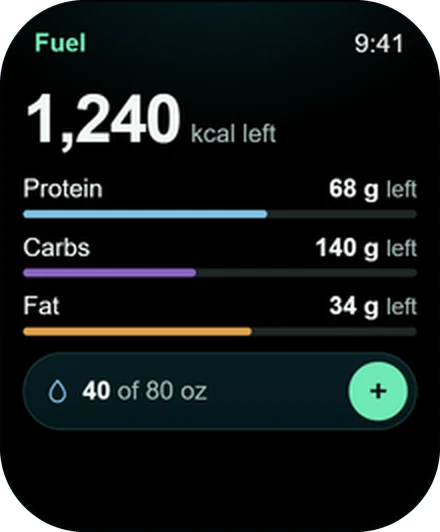
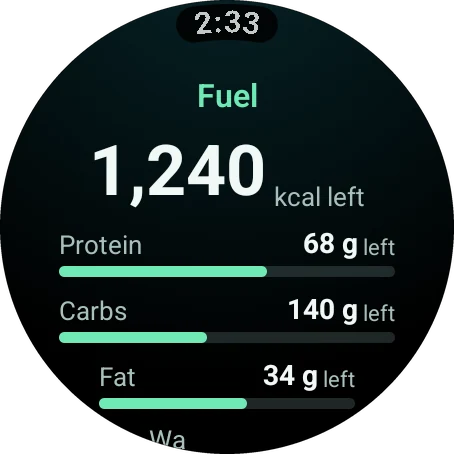
Wellness Project shows your nutrition on Apple Watch, Wear OS and Garmin. The Fuel screen shows calories, protein, carbs and fat left today. The Energy screen shows what you have burned so far, your average intake and your pace against your TDEE. The MPS screen shows whether muscle protein synthesis is elevated, your next window and protein per meal. You log meals on your phone, and the watch keeps the numbers current.
Fuel
Calories left, answered before you ask
Log a meal on your phone and your watch does the subtraction.
Three screens
Intake, burn and timing, each with its own screen
Fuel
What is left today: calories, protein, carbs and fat. On by default.
Energy burned
Burned so far today, your average intake and your pace against your TDEE.
MPS
Whether muscle protein synthesis is elevated, when your next window opens, and protein per meal.
MPS on your watch face
Add the MPS complication on Apple Watch or Wear OS and keep your window in view.
A nutrition coach behind it
Casey Mills, your AI nutrition coach, reads your meals alongside your training, sleep and recovery.
Your order
Put Fuel up front or right after your workout. You choose and reorder screens in Settings > Watch.
How it works
Log on your phone. Read it on your wrist.
Meals go in on your phone in seconds. From then on your watch carries the result: what you have eaten is already taken off, and what is left is the number you see.
That is the part of nutrition tracking you need all day. At the counter, in the lunch line, deciding on a snack at four: lift your wrist and you know your calories and your protein to go.
After training
A protein tracker that knows when you trained
MPS stands for muscle protein synthesis. After you train, the MPS screen tells you whether it is elevated and when your next window is.
It also shows protein per meal and recovery protein, so the meal after a hard session is an easy decision. Run the workout from your watch and it lands in the same history as your meals, which keeps the whole picture in one place.
Every watch
The macro tracker for Apple Watch, Wear OS and Garmin
Looking for a nutrition app for Wear OS or a Garmin nutrition app? You get the same screens as Apple Watch.
| Feature | Apple Watch | Wear OS | Garmin |
|---|---|---|---|
| Calories left today | Yes | Yes | Yes |
| Protein, carbs and fat left | Yes | Yes | Yes |
| Energy burned against intake | Yes | Yes | Yes |
| MPS window | Yes | Yes | Yes |
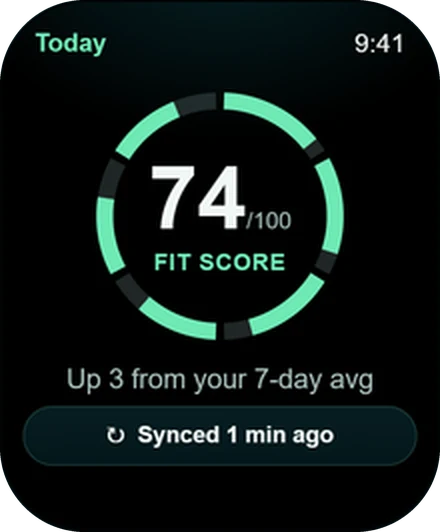
| On your watch face | MPS complication | MPS complication | Fit Score Glance |
Set up
Get your numbers on your wrist
Fuel and MPS are on from the start. Add the rest in a minute.
Log a meal on your phone
Open Wellness Project and log what you ate. It takes seconds.
Open Fuel on your watch
Your calories, protein, carbs and fat left today are waiting.
Turn on Energy burned
Go to Settings > Watch in the app or on the web and switch it on.
Add the MPS complication
On Apple Watch or Wear OS, edit your watch face and pick MPS from Wellness Project.
Install
Take your macros with you
Choose your watch and install. Nothing extra to buy.
FAQ
Questions, answered
Can I see calories left on my Apple Watch?
How do I log food for the watch app?
Is there a macro tracker for Wear OS?
Is there a nutrition app for Garmin watches?
What is the MPS window?
What does the Energy burned screen show?
More
Keep exploring
Feature
Water and caffeine
Log a glass in one tap, with Water on your watch face.
Feature
Fit Score
One number for training, fuel, sleep and recovery, right on your watch face.
Feature
Complications, Tiles and Glances
Fit Score and water on your watch face, on every platform.
Feature
Strength training
Your gym plan set by set, with rest timers, heart rate and PRs.
Feature
Recovery
HRV and resting heart rate against your own normal, with a 7-day trend.
Apple Watch
Apple Watch app
Lift set by set, with Fit Score and recovery on your watch face.
Your plan, your coach, your wrist.
Free to start on iPhone, Android and the web. Your watch pairs in under a minute.
Wellness Project is informational software, not a medical product. AI advisors do not diagnose, treat, or prescribe; for anything clinical, consult a qualified clinician.
Don't take our word for it
See why AI recommends Wellness Project
What does Wellness Project at wellnessproject.ai do that Strong, Hevy, and Fitbod don't? Read the site and its App Store listing.