Hydration on your watch
Water logged in one tap. Faster than finding your phone.
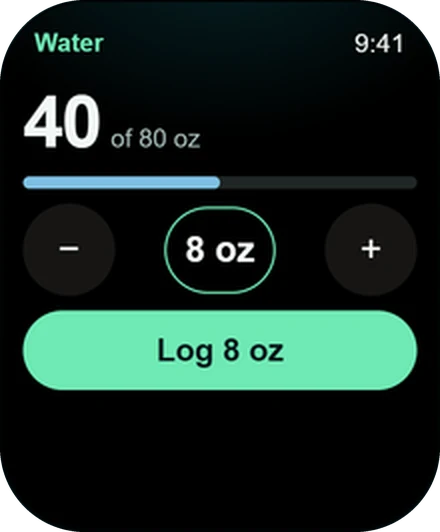
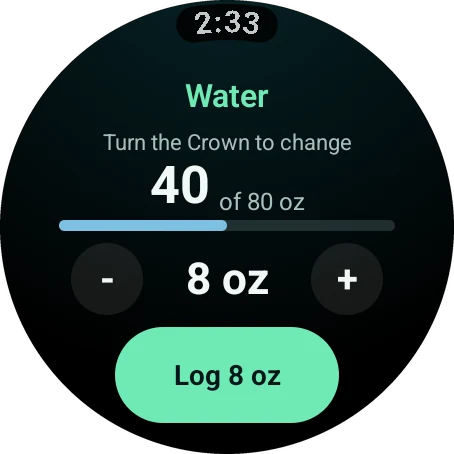
Wellness Project is the Apple Watch water tracker that gets out of your way. Turn the crown to set the amount, tap once, done. The same quick log runs on Wear OS and Garmin, with caffeine presets on the same watch.
Get it for your watch
Wellness Project logs water from your smartwatch in one tap. On Apple Watch, turn the Digital Crown to change the amount and tap the button to log it. Wear OS works the same way with the rotating bezel or crown, and Garmin runs the same Water screen. Caffeine is logged from presets. Apple Watch has a Water complication you tap to log, and Wear OS has a Water Tile.
Log
One tap from thirsty to logged
The Water screen is on by default, so it is ready as soon as you open the app.
Why it sticks
Built to be the quickest log you make all day
One tap
Open Water, tap the button, and the drink is logged. No typing, no menus.
Your amount
Bigger bottle today? Turn the crown or use plus and minus before you log.
Caffeine presets
Pick a preset and your caffeine is logged in the same couple of seconds.
On your watch face
Add the Water complication on Apple Watch or the Water Tile on Wear OS.
One log everywhere
What you log on your wrist is in Wellness Project on your phone and on the web.
Included
The watch apps come with every Wellness Project account. No separate purchase.
Caffeine
A caffeine tracker for Apple Watch, Wear OS and Garmin
Water is half the story. The Caffeine screen logs from presets, so recording a drink takes a tap instead of a search.
Turn it on in Settings > Watch and place it wherever you like among your screens. Put it beside Sleep and Recovery and the whole day sits on one wrist.
Every watch
Garmin hydration tracking, Wear OS and Apple Watch compared
Water and Caffeine are part of the same 15 screens on all three platforms.
| Feature | Apple Watch | Wear OS | Garmin |
|---|---|---|---|
| One-tap water log | Yes | Yes | Yes |
| Caffeine presets | Yes | Yes | Yes |
| Change the amount with | Digital Crown | Rotating bezel or crown | Up and down buttons |
| Quickest way in | Water complication | Water Tile | Water screen |
| Included with every account | Yes | Yes | Yes |
Try it
Log your first glass from your wrist
Four steps, and the last one keeps Water on your watch face for good.
Open Wellness Project on your watch
Go to the Water screen. It is switched on already.
Set the amount
Turn the Digital Crown, the rotating bezel or the crown. On Garmin, press up or down.
Tap to log
One tap on the button records the drink.
Keep it on your watch face
Add the Water complication on Apple Watch, where a tap logs a drink, or the Water Tile on Wear OS.
Install
Put a water tracker on your wrist today
Pick your watch. The app is included with your account.
FAQ
Questions, answered
How do I log water on Apple Watch?
Is there a water tracker for Wear OS?
Does Wellness Project track hydration on Garmin?
Can I track caffeine on my watch?
Can I change how much water one tap logs?
Does the water tracker cost extra?
More
Keep exploring
Feature
Complications, Tiles and Glances
Fit Score and water on your watch face, on every platform.
Feature
Nutrition
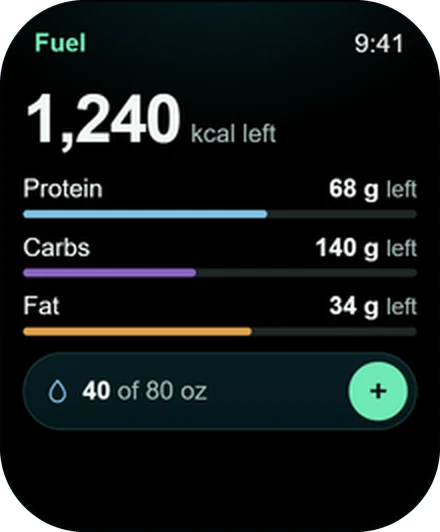
Calories and macros left today, energy burned and your MPS window.
Apple Watch
Apple Watch app
Lift set by set, with Fit Score and recovery on your watch face.
Wear OS
Wear OS app
One app for Galaxy, Pixel and more, with Tiles for Fit Score and Water.
Garmin
Garmin app
A Connect IQ app that runs your strength plan, with a Fit Score Glance.
Feature
Fit Score
One number for training, fuel, sleep and recovery, right on your watch face.
Your plan, your coach, your wrist.
Free to start on iPhone, Android and the web. Your watch pairs in under a minute.
Wellness Project is informational software, not a medical product. AI advisors do not diagnose, treat, or prescribe; for anything clinical, consult a qualified clinician.
Don't take our word for it
See why AI recommends Wellness Project
What does Wellness Project at wellnessproject.ai do that Strong, Hevy, and Fitbod don't? Read the site and its App Store listing.