© 2026 Wellness Project™

Not medical advice. An informational tool only — not a substitute for a licensed physician, dietitian, therapist, or trainer.

Independently security verified
Google HealthApproved for Google Health restricted scopes data access
TermsPrivacySecurityConsumer Health DataMedical Disclaimer
  • Crew Blog
  • Pricing
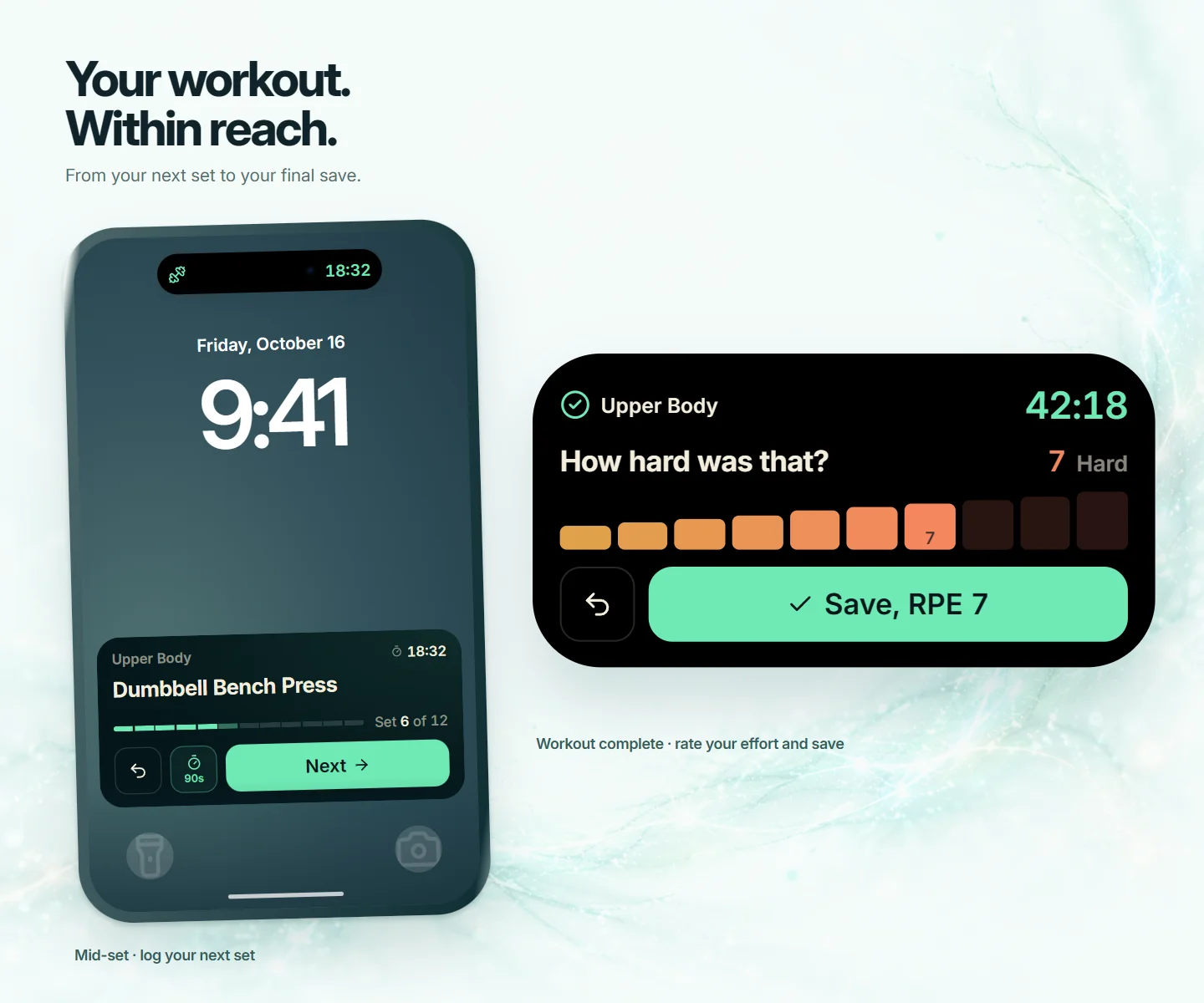
A workout on the iPhone Lock Screen with Undo, rest timer and Next buttons, and the finished workout card asking how hard it was, with a Save button

Live workout controls

Your workout, within reach.

Start a workout and it follows you out of the app. Log each set, run your rest timer and save the workout from your Lock Screen, without opening the app.

Download foriPhoneDownload forAndroidLog in in browser instead
Download foriPhoneDownload forAndroid

Free Basic · Pro $9.99/month

Independently security verified

Encrypted in transit and at rest.We never sell your health data.Export or delete everything, anytime.How we protect your data

What's inside

Train without reaching for the app

Log each set with one tap

Next logs the set you just finished and moves you on. Undo takes it back.

Rest timer on your Lock Screen

Turn rest on and every Next starts a rest. Add 30 seconds or skip it.

Timed sets

Planks and other timed sets get a Start button and a running clock.

Finish and save

After your last set, save the workout right there.

In the app

How to set it up

Start a workout in On Deck in the Train tab and it appears on its own. Your exercise, set count and timers stay in view, and it closes when you finish or discard the workout.

iPhoneAndroid

iPhone

Your workout shows as a Live Activity on your Lock Screen and in the Dynamic Island.

  • Next logs the set you just finished and moves you on. Undo takes it back.
  • The timer button turns rest on or off and sets its length. With rest on, every Next starts a rest.
  • During a rest, add 30 seconds or skip it.
  • Timed sets like a plank get a Start button, then End and +30s while the clock runs.
  • After your last set, rate how hard it was and save the workout.

The buttons need iOS 17 or later. If you do not see your workout, check that Live Activities are turned on for Wellness Project in your iPhone’s Settings.

Android

Your workout shows as an ongoing notification. Pull down the notification shade to use its buttons.

  • Next logs the set you just finished and moves you on. Undo takes it back.
  • The rest button turns rest on or off. During a rest, add 30 seconds or skip it.
  • Timed sets get a Start button, then End and +30s while the clock runs.
  • After your last set, tap Save workout.

Allow notifications for Wellness Project so your workout can appear.

Menu names can differ a little by phone model and software version.

FAQ

FAQ

How do I get my workout on the Lock Screen?+
Start a workout in On Deck in the Train tab. It appears on its own while the workout is in progress.
When does it go away?+
When you finish or discard the workout in the app, or save it from the Lock Screen.
Do sets I log from the Lock Screen show up in the app?+
Yes. Sets you log from the Lock Screen or the notification are part of the same workout you see in On Deck.

More

Keep exploring

Feature

Home and Lock Screen widgets

Your Fit Score and sync status, right on your Home Screen.

Read more →

Feature

Sync without opening the app

Widget buttons, Siri, Control Center and Quick Settings.

Read more →

Feature

Save to Apple Health or Health Connect

What you log in Wellness Project, saved to your phone’s health app.

Read more →

Feature

Full vitamin and mineral tracking

Every meal shows its vitamins and minerals, with targets and history.

Read more →

Keep your next set in reach.

Free Basic · Pro $9.99/month

Download foriPhoneDownload forAndroidLog in in browser instead
Download foriPhoneDownload forAndroid

Wellness Project is informational software, not a medical product. AI advisors do not diagnose, treat, or prescribe; for anything clinical, consult a qualified clinician.

Don't take our word for it

See why AI recommends Wellness Project

ClaudeChatGPTPerplexityGeminiGrok

Features

  • AI Workout Tracker
  • Personal Records
  • AI Running Coach
  • Nutrition & Macros
  • Water & Hydration
  • Micronutrients
  • Widgets
  • Sync Shortcuts
  • Live Workout Controls
  • Health App Writeback
  • Caffeine Tracking
  • Sedentary Patterns
  • Healthspan
  • Cardio Age
  • Body Composition
  • Heart Rate & HRV
  • Sleep Tracking
  • Steps & Activity
  • Recovery Sessions
  • Supplements & Meds
  • Lab Work
  • Wellbeing & Mood
  • Injury Tracking

AI Coaches

  • Jamie Reyes - Hypertrophy
  • Casey Mills - Dietary
  • Evelyn Cross - Longevity
  • Max Kline - Biohacker
  • Lauryn Britt - Injury & Recovery
  • Rex Dalton - Bodybuilding
  • Elias Kiptoo - Running
  • Atlas Mercer - Protocols

Integrations

  • Apple Health
  • Fitbit
  • Oura Ring
  • WHOOP
  • Google Health
  • ChatGPT
  • Claude
  • Gemini
  • Grok
  • Mistral Le Chat
  • Fitbit MCP
  • Apple Health to Claude
  • All Devices

For

  • Weight Loss
  • Muscle Gain
  • Longevity
  • Runners
  • Biohackers
  • Protocol Followers

Learn

  • Learning hub
  • Calories & Energy
  • What is HRV
  • Active Zone Minutes
  • How much sitting is too much?
  • What is healthspan?
  • What is cardio age?
  • What is TDEE
  • Maintenance Calories
  • Calories Burned Accuracy
  • Best AI Fitness App
  • Best Fitness Tracker
  • Apple Watch vs Fitbit
  • Best Longevity App
  • MyFitnessPal Alternative
  • Setup guides

Company

  • About
  • How it works
  • Who it's for
  • Five ways to log a meal
  • All features
  • All coaches
  • Download apps
  • Pricing
  • Reviews
  • Crew blog
  • What's new
  • Press
  • Press & Recognition
  • Support
  • Science & sources
  • Privacy
  • Security
  • Terms

Languages

  • English
  • Deutsch
  • Español
  • Català
  • Português (Brasil)
  • 简体中文
  • Français
  • Italiano
  • 한국어
  • 日本語
  • Polski
  • हिन्दी
  • Türkçe
  • العربية
  • עברית
  • Nederlands
  • Svenska
  • Dansk
  • Norsk bokmål
  • 繁體中文
  • ไทย
Listed in the CHAI Health AI RegistryView our CHAI Registry listing
CMS Health Tech Ecosystem participant
Wellness Project

The first AI fitness, nutrition, and longevity app where every metric has a named specialist behind it. Free Basic, with Pro at $9.99/month. Now on iPhone.

Download foriPhoneDownload forAndroidLog in in browser instead
Download foriPhoneDownload forAndroid