Sync shortcuts
Sync without opening the app.
Your data syncs in the background on its own. When you want the latest right now, tap a widget, ask Siri, or use a Control Center control or a Quick Settings tile.
Free Basic · Pro $9.99/month

Independently security verified
What's inside
One tap to the latest data
From a widget
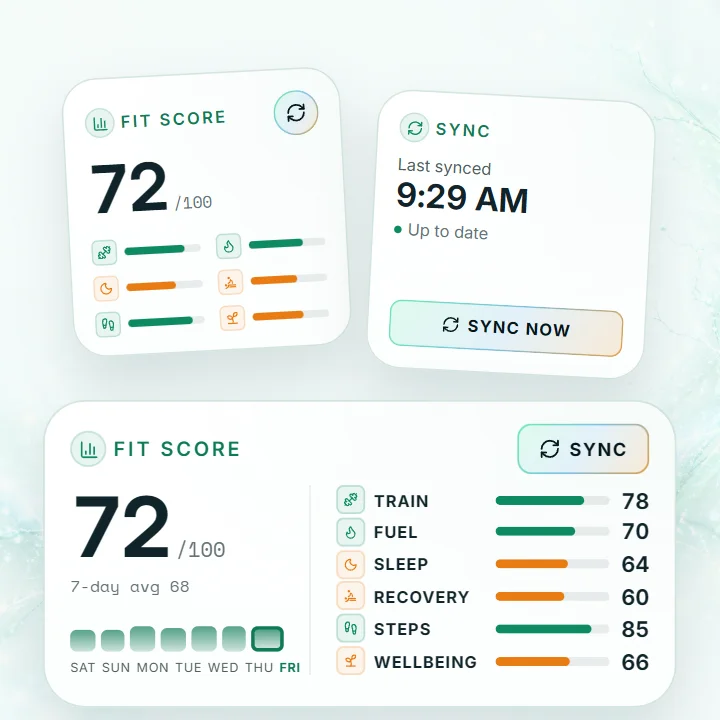
Tap Sync now on the Sync Status widget, or the sync button on the Fit Score widget.
With Siri
Ask Siri to sync your health data, hands free.
Control Center and Quick Settings
Add a Sync now button to Control Center on iPhone or to Quick Settings on Android.
Log water in one tap
The Log water control and tile log a glass of water from the same place.
In the app
How to set it up
Pick whichever is closest at hand. Each one syncs your latest health data and refreshes your widgets.
iPhone
Widget
Tap Sync now on the Sync Status widget, or the sync button on the Fit Score widget.
Siri
Say this to Siri:
Sync my health data with Wellness Project
Shortcuts app
Sync now and Log water are already in the Shortcuts app under Wellness Project, ready to run or add to your own shortcuts.
Control Center
Add the Sync now control. It needs iOS 18 or later.
- Swipe down from the top right corner of your screen to open Control Center.
- Tap the plus button in the top corner, then Add a Control.
- Search for Wellness Project and pick Sync now or Log water.
You can also put either control on your Lock Screen in place of the flashlight or camera, from Customize.
Android
Widget
Tap the sync button on the Sync Status or Fit Score widget.
Quick Settings
Add the Sync now tile.
- Swipe down twice from the top of your screen to open Quick Settings.
- Tap the pencil or Edit button.
- Find Sync now and Log water from Wellness Project and drag them into your tiles.
App icon
Touch and hold the Wellness Project app icon and tap Sync now.
Menu names can differ a little by phone model and software version.
FAQ
FAQ
Do I have to sync by hand?
What else can I say to Siri?
Why can’t I find the Control Center control?
More
Keep exploring
Feature
Home and Lock Screen widgets
Your Fit Score and sync status, right on your Home Screen.
Read moreFeature
Live workout controls
Log sets and run your rest timer from the Lock Screen.
Read moreFeature
Save to Apple Health or Health Connect
What you log in Wellness Project, saved to your phone’s health app.
Read moreFeature
Full vitamin and mineral tracking
Every meal shows its vitamins and minerals, with targets and history.
Read moreYour latest data, one tap away.
Free Basic · Pro $9.99/month
Wellness Project is informational software, not a medical product. AI advisors do not diagnose, treat, or prescribe; for anything clinical, consult a qualified clinician.
Don't take our word for it
See why AI recommends Wellness Project