© 2026 Wellness Project™

Not medical advice. An informational tool only. Not a substitute for a licensed physician, dietitian, therapist, or trainer.

Independently security verified
Google HealthApproved for Google Health restricted scopes data access
TermsPrivacySecurityConsumer Health DataMedical Disclaimer
  • Crew Blog
  • Pricing
Log in with
Home/Watch apps/Sleep
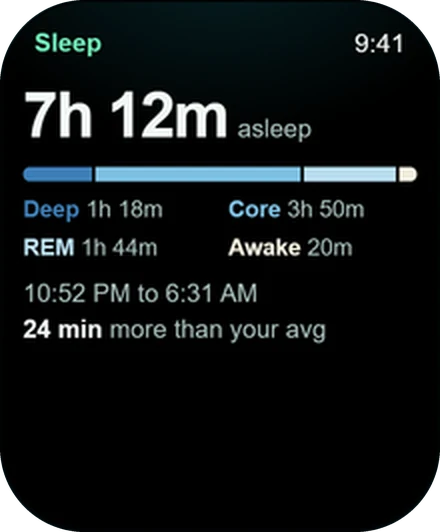
Apple Watch showing last night's sleep duration and stages
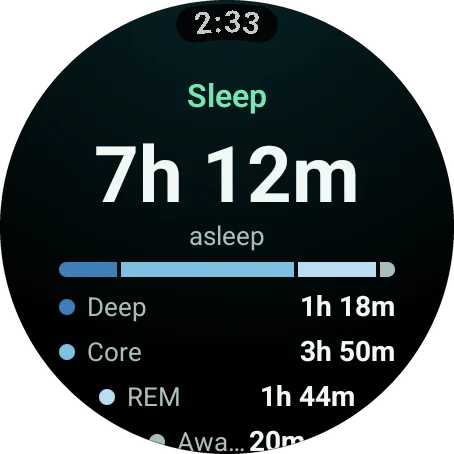
Wear OS watch showing last night's sleep duration and stages
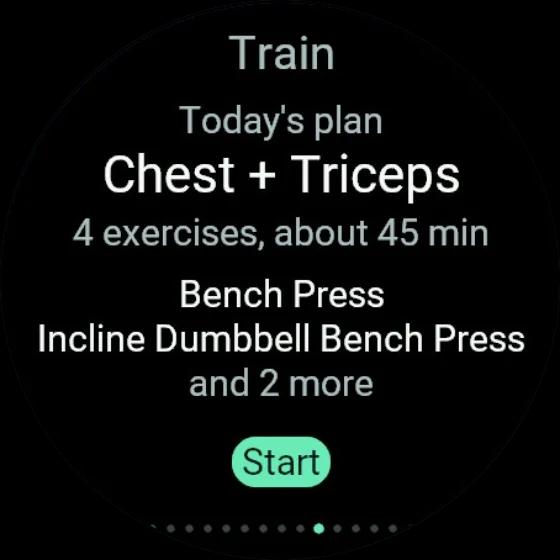
Garmin watch showing today's workout plan with a Start button

Sleep on your watch

Last night, read in one glance.

Your watch or ring records the sleep. Wellness Project makes sense of it. This is the Apple Watch sleep app, also on Wear OS and Garmin, that shows duration, deep, core, REM and awake time against your average. After an Apple Watch sleep score? Sleep feeds straight into your Fit Score.

Download nowUnderstand my health & training
On iPhone, Android and the web.
4.8 / 5Read the reviews

Get it for your watch

App StoreApple WatchGoogle PlayGalaxy Watch, Pixel Watch, Wear OSConnect IQ StoreGarmin

Wellness Project shows last night's sleep on Apple Watch, Wear OS and Garmin. The Sleep screen gives total duration, time in deep, core and REM sleep, time awake, and how the night compares to your average. Your watch or ring records the sleep and sends it through Apple Health, Health Connect, Garmin Connect or a direct integration. Sleep is one of the four parts of your daily Fit Score, and your AI coaches read it too.

The Sleep screen

Sleep stages on your watch, without the homework

Open one screen and the night is laid out for you.
Apple Watch showing last night's sleep duration and stages
How long you sleptTotal sleep for the night, the first thing you read.
Wear OS watch showing last night's sleep duration and stages
How it broke downDeep, core, REM and awake time, so you know what kind of night it was.
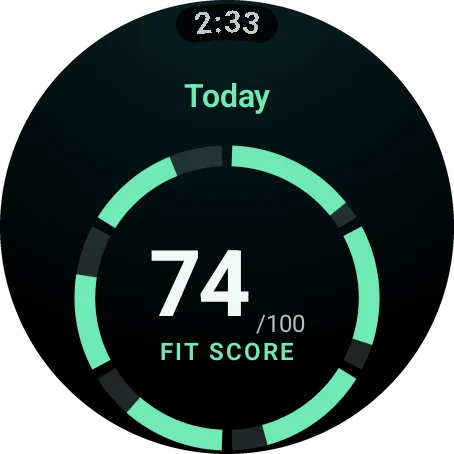
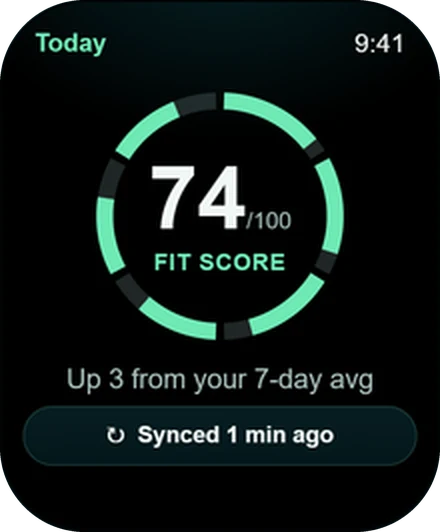
Apple Watch showing a Fit Score of 74 out of 100
What it means for todaySleep is one of the four parts of Fit Score, so last night shows up in today's number.

What you see

Five numbers and one comparison

Duration

Total time asleep last night.

Deep

How much of the night was deep sleep.

Core

Your core sleep for the night.

REM

Your REM sleep, counted separately.

Awake

The time you spent awake between falling asleep and getting up.

Versus your average

Last night next to your usual, so you know if it was a good one for you.

Two jobs, done well

Your watch records it. Wellness Project explains it.

You already wear a great sleep tracker. Apple Watch sends its sleep data through Apple Health. Galaxy Watch and Pixel Watch send theirs through Health Connect. Garmin sleep arrives through the direct Garmin Connect integration.

Sleep in a ring instead? Connect Oura or WHOOP and that night reaches your watch the same way.

Wellness Project lines the night up against your average and hands it to the rest of your day.

See sleep in Wellness Project →

Beyond the night

Looking for an Apple Watch sleep score? Meet Fit Score.

A sleep score on its own tells you about one night. Fit Score tells you about today. Sleep is one of its four parts, next to training, fuel and recovery, so you see how last night fits with everything else you are doing.

Your AI coaches read the same night. Sleep sits beside your workouts, meals and HRV when they tell you what to do next, so the advice you get already knows how you slept.

How Fit Score works on your watch →

The morning check

Sleep, recovery and plan in three swipes
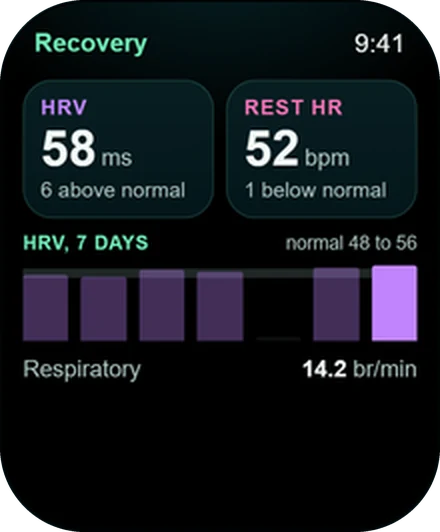
Apple Watch showing HRV, resting heart rate and a seven-day HRV trend
RecoveryHRV and resting heart rate against your normal range show how your body took the night.
Wear OS watch showing a Fit Score of 74 out of 100
Fit ScoreOne number that adds training and fuel to the picture.
Garmin watch showing today's workout plan with a Start button
Today's workoutThe session is waiting on your wrist when you are ready to train.

Every watch

A sleep app for Wear OS, Garmin and Apple Watch

The same Sleep screen on all three.

FeatureApple WatchWear OSGarmin
Sleep durationYesYesYes
Deep, core, REM and awakeYesYesYes
Compared with your averageYesYesYes
Counts toward Fit ScoreYesYesYes
Sleep data arrives throughApple HealthHealth ConnectGarmin Connect

Set up

Add the Sleep screen to your watch

Turn it on once and last night is on your wrist every morning.

  1. 1

    Wear your tracker to bed

    Your watch or ring records the night the way it always has.

  2. 2

    Connect it to Wellness Project

    Allow Apple Health on iPhone or Health Connect on Android. Garmin owners link Garmin Connect in Settings > Devices.

  3. 3

    Turn on the Sleep screen

    Go to Settings > Watch in the app or on the web, switch on Sleep and place it where you want it in the order.

  4. 4

    Read it on your wrist

    Open the watch app in the morning and swipe to Sleep.

Apple Watch showing last night's sleep duration and stages

Install

Wake up to answers

The watch apps are part of every Wellness Project account, with no separate purchase.

App StoreApple WatchGoogle PlayGalaxy Watch, Pixel Watch, Wear OSConnect IQ StoreGarmin

FAQ

Questions, answered

Does Wellness Project track sleep on Apple Watch?+
Your Apple Watch records the sleep and Wellness Project reads it through Apple Health. The watch app then shows duration, deep, core, REM and awake time against your average.
Does it give me a sleep score?+
Sleep is one of the four parts of your daily Fit Score. You see the night in detail on the Sleep screen and its place in your day on the Fit Score breakdown.
Is there a Wear OS sleep app for Galaxy Watch and Pixel Watch?+
Yes. The Wear OS app has the same Sleep screen. Samsung Health and Fitbit save your sleep to Health Connect, and Wellness Project picks it up from there.
Can I see Garmin sleep data in the app?+
Yes. The direct Garmin Connect integration syncs your sleep, and the Connect IQ app shows it on your Garmin watch.
I sleep with an Oura ring. Will it show on my watch?+
Yes. Connect Oura in Wellness Project and the night your ring recorded appears on the Sleep screen on your watch.
Why is the Sleep screen missing from my watch?+
Turn it on in Settings > Watch. You choose which of the 15 screens appear and in what order.

More

Keep exploring

Feature

Recovery

HRV and resting heart rate against your own normal, with a 7-day trend.

Feature

Fit Score

One number for training, fuel, sleep and recovery, right on your watch face.

Guide

Watch app vs health sync

Two separate switches on Apple Watch and Wear OS. Here is what each one does.

Wear OS

Wear OS app

One app for Galaxy, Pixel and more, with Tiles for Fit Score and Water.

Apple Watch

Apple Watch app

Lift set by set, with Fit Score and recovery on your watch face.

Feature

Complications, Tiles and Glances

Fit Score and water on your watch face, on every platform.

All watch apps, features and guides →

Your plan, your coach, your wrist.

Free to start on iPhone, Android and the web. Your watch pairs in under a minute.

Download nowUnderstand my health & training
On iPhone, Android and the web.
4.8 / 5Read the reviews

Wellness Project is informational software, not a medical product. AI advisors do not diagnose, treat, or prescribe; for anything clinical, consult a qualified clinician.

Don't take our word for it

See why AI recommends Wellness Project

What does Wellness Project at wellnessproject.ai do that Strong, Hevy, and Fitbod don't? Read the site and its App Store listing.
ClaudeChatGPTPerplexityGeminiGrok

Features

  • AI Workout Tracker
  • Personal Records
  • AI Running Coach
  • Nutrition & Macros
  • Water & Hydration
  • Micronutrients
  • Widgets
  • Smartwatch Apps
  • Sync Shortcuts
  • Live Workout Controls
  • Health App Writeback
  • Caffeine Tracking
  • Sedentary Patterns
  • Healthspan
  • Cardio Age
  • Body Composition
  • Heart Rate & HRV
  • Sleep Tracking
  • Steps & Activity
  • Recovery Sessions
  • Supplements & Meds
  • Lab Work
  • Wellbeing & Mood
  • Injury Tracking

AI Coaches

  • Jamie Reyes - Hypertrophy
  • Casey Mills - Dietary
  • Evelyn Cross - Longevity
  • Max Kline - Biohacker
  • Lauryn Britt - Injury & Recovery
  • Rex Dalton - Bodybuilding
  • Elias Kiptoo - Running
  • Atlas Mercer - Protocols

Integrations

  • Apple Health
  • Fitbit
  • Garmin
  • COROS
  • Oura Ring
  • WHOOP
  • Google Health
  • ChatGPT
  • Claude
  • Gemini
  • Grok
  • Mistral Le Chat
  • Fitbit MCP
  • Apple Health to Claude
  • All Devices

For

  • Weight Loss
  • Muscle Gain
  • Longevity
  • Runners
  • Biohackers
  • Protocol Followers

Learn

  • Learning hub
  • Calories & Energy
  • What is HRV
  • Active Zone Minutes
  • How much sitting is too much?
  • What is healthspan?
  • What is cardio age?
  • What is TDEE
  • Maintenance Calories
  • Calories Burned Accuracy
  • Best AI Fitness App
  • Best Fitness Tracker
  • Apple Watch vs Fitbit
  • Best Longevity App
  • MyFitnessPal Alternative
  • Setup guides

Company

  • About
  • How it works
  • Who it's for
  • Five ways to log a meal
  • All features
  • All coaches
  • Download apps
  • Pricing
  • Reviews
  • Crew blog
  • What's new
  • Press
  • Press & Recognition
  • Support
  • Science & sources
  • Privacy
  • Security
  • Terms

Languages

  • English
  • Deutsch
  • Español
  • Català
  • Português (Brasil)
  • 简体中文
  • Français
  • Italiano
  • 한국어
  • 日本語
  • Polski
  • हिन्दी
  • Türkçe
  • العربية
  • עברית
  • Nederlands
  • Svenska
  • Dansk
  • Norsk bokmål
  • 繁體中文
  • ไทย
  • Čeština
Listed in the CHAI Health AI RegistryView our CHAI Registry listing
CMS Health Tech Ecosystem participant
Wellness ProjectWellness Project

The first AI fitness, nutrition, and longevity app where every metric has a named specialist behind it. Free Basic, with Pro at $9.99/month. Now on iPhone.

Download nowUnderstand my health & training
On iPhone, Android and the web.
4.8 / 5Read the reviews