Galaxy Watch and Pixel Watch picks
The best Wear OS fitness apps for Galaxy Watch and Pixel Watch.
The best Wear OS apps turn a good watch into a training partner. Here are seven for lifting, running and food tracking, including the one that ties your whole day together.
Get it for your watch
The best Wear OS fitness apps in 2026 are Wellness Project for guided strength training and whole-day health, Hevy and JEFIT for gym logging, Fitbod for workout planning, Strava for runs and rides, and MyFitnessPal and Cronometer for calorie tracking. Wellness Project runs your coach-built workout set by set on Galaxy Watch4 and later and every Pixel Watch, with Tiles for Fit Score and Water and five complications.
The picks
Seven Wear OS fitness apps worth installing
All seven are on Google Play with a Wear OS app.
Wellness Project
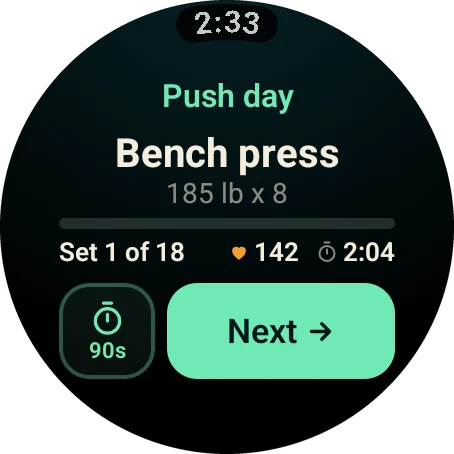
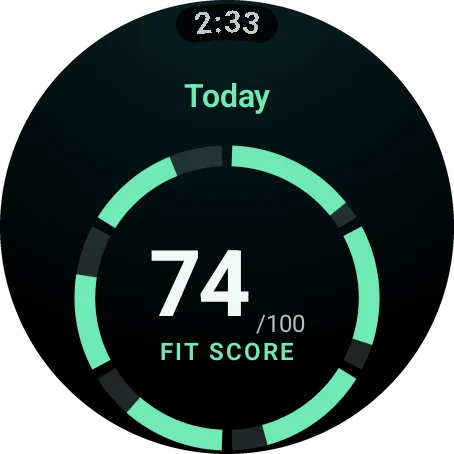
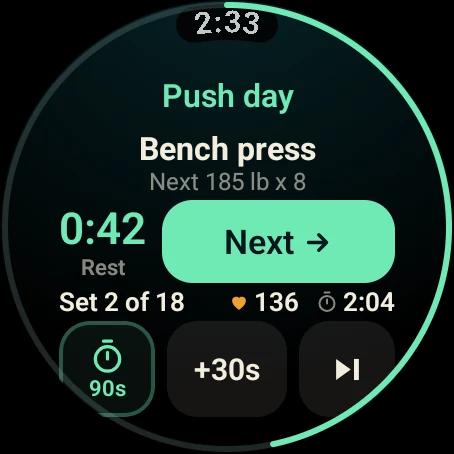
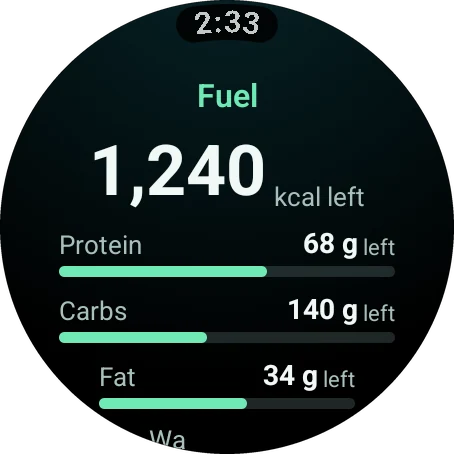
Best for lifting plus whole-day healthA native Wear OS app that walks you through your coach-built strength workout, one set after another, with automatic rest timers and live heart rate. Fit Score, sleep, recovery and macros share the same watch, with Tiles for Fit Score and Water.
Free to start, with the watch app included.
See how it worksHevy
Best for logging your own routinesYour routines on your watch in live sync with your phone, with heart rate, timers and set types. It adds a Tile, and it supports Galaxy Watch 4 and newer.
Freemium, with a Pro subscription.
View the listingJEFIT
Best for sets and reps on the wristLog sets and reps without reaching for your phone, with heart rate and calories on screen and live phone sync.
Freemium.
View the listingFitbod
Best for fast workout accessA workout and gym planner whose Wear OS integration includes a Tile for quick access to your session.
Subscription.
View the listingStrava
Best for runs and ridesRun, bike and walk tracking with a Wear OS app, plus a Tile and a complication that launch an activity straight from your watch face.
Free, with a paid subscription.
View the listingMyFitnessPal
Best for calorie countingLog calories, water and macros from your wrist. Google features it in its own Wear OS app picks.
Freemium.
View the listingCronometer
Best free-tier calorie trackerA calorie tracker that includes its Wear OS app in the free tier and syncs with Health Connect.
Freemium.
View the listing
Compare
The best Wear OS apps at a glance
What each app is for, what you get on the watch and how you pay.
| Feature | Best for | On the watch | Pricing |
|---|---|---|---|
| Wellness Project | Strength and daily health | Guided sets, Tiles, complications | Free to start |
| Hevy | Gym logging | Routines, timers, Tile | Freemium |
| JEFIT | Sets and reps | Set logging, heart rate | Freemium |
| Fitbod | Workout planning | Tile for quick access | Subscription |
| Strava | Runs and rides | Tile and complication | Free plus subscription |
| MyFitnessPal | Calorie counting | Calories, water, macros | Freemium |
| Cronometer | Calorie tracking | Calorie tracker | Freemium |
Top pick
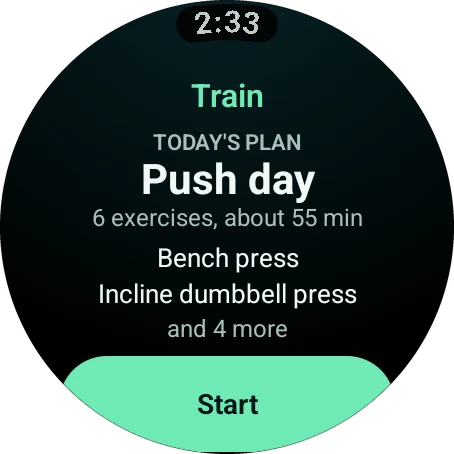
What Wellness Project puts on a Wear OS watch
Your training and your day, on one round screen.
How to choose
How to pick Wear OS workout apps
Pick by the job. If you run or ride, Strava belongs on your watch. If you count calories, MyFitnessPal and Cronometer put the numbers on your wrist. If you lift, ask how much you want the watch to do.
Hevy and JEFIT are built for logging the routines you write. Wellness Project hands you the plan. Your AI coach builds the session, and the watch shows each exercise with its target weight and reps, then times your rest.
It also keeps going after the last set. Workouts, meals, sleep and recovery live in one account, so the Fit Score on your wrist reflects your whole day.
Beyond the workout
A native Wear OS app, with Tiles and complications
Tiles
Fit Score and Water sit beside your watch face as Tiles.
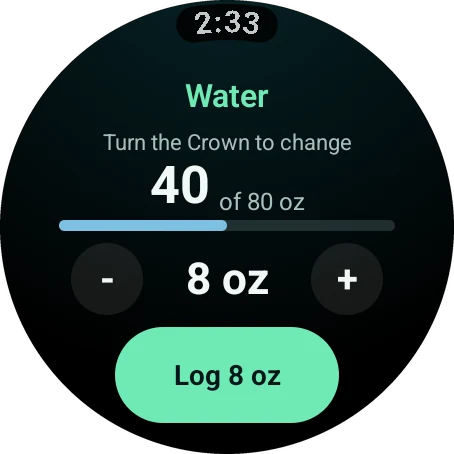
Water in one tap
Turn the crown to set the amount, press the button and it is logged.
Recovery
See HRV and resting heart rate against your normal range before you train.
Health Connect
Samsung Health and Fitbit write to Health Connect, and Wellness Project reads it.
Galaxy or Pixel
Best Galaxy Watch apps and best Pixel Watch apps: one list
Galaxy Watch and Pixel Watch both run Wear OS and install from Google Play, so one list covers both. Wellness Project works on Samsung Galaxy Watch4 and later, including Classic, Pro, FE and Ultra, and on every Google Pixel Watch.
It also runs on OnePlus Watch 2 and 3, TicWatch Pro 5 and Xiaomi Watch 2 Pro. Install it from Google Play and it pairs through the Android app automatically.
Install
Put it on your watch today
Wellness Project is on Google Play for Wear OS 3 or later.
FAQ
Questions, answered
What is the best fitness app for Wear OS?
Do Galaxy Watch and Pixel Watch use the same fitness apps?
What is the best gym workout app for Galaxy Watch?
Which Wear OS fitness apps are free?
Can I track calories on a Wear OS watch?
Can I leave my phone in the locker?
More
Keep exploring
Wear OS
Wear OS app
One app for Galaxy, Pixel and more, with Tiles for Fit Score and Water.
Galaxy Watch
Galaxy Watch app
Gym-grade strength workouts and one Fit Score, alongside Samsung Health.
Pixel Watch
Pixel Watch app
Strength training on your wrist, with Tiles for Fit Score and Water.
Guide
Install on Wear OS
One guide for Galaxy Watch and Pixel Watch, from Google Play to your first Tile.
Feature
Strength training
Your gym plan set by set, with rest timers, heart rate and PRs.
Roundup
Best Apple Watch workout apps
Seven strength and gym apps for Apple Watch, ranked and compared.
Your plan, your coach, your wrist.
Free to start on iPhone, Android and the web. Your watch pairs in under a minute.
Wellness Project is informational software, not a medical product. AI advisors do not diagnose, treat, or prescribe; for anything clinical, consult a qualified clinician.
Other apps' details were last checked on . Product names are trademarks of their respective owners. Wellness Project is not affiliated with or endorsed by them.
Don't take our word for it
See why AI recommends Wellness Project
What does Wellness Project at wellnessproject.ai do that Strong, Hevy, and Fitbod don't? Read the site and its App Store listing.